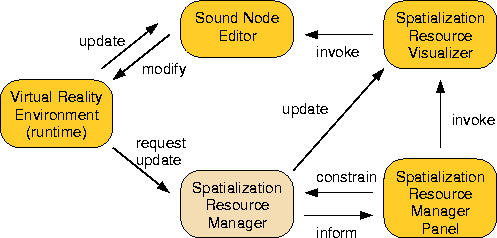
Figure 8 shows the data flow between the system components. All tools keep each other up-to-date. Changes from the virtual reality environment propagate to the sound node editor directly. Requests for sound resources are processed by the sound spatialization resource manager and then visualized by the Spatialization Resource Visualizer (seen on the right of Figure 6). The user can select a resource in the visualizer and invoke the sound node editor for the associated sound node. A change here would propagate back to the visualizer via the runtime environment and resource manager. The resource manager updates the panel, so that numeric information about the resource allocation process is available. The panel can also change parameter of the allocation process, which will also propagate through the tools.
Figure 8: Tool data flow